
Free Online Fake FLAC Checker & Spectrogram Analyzer
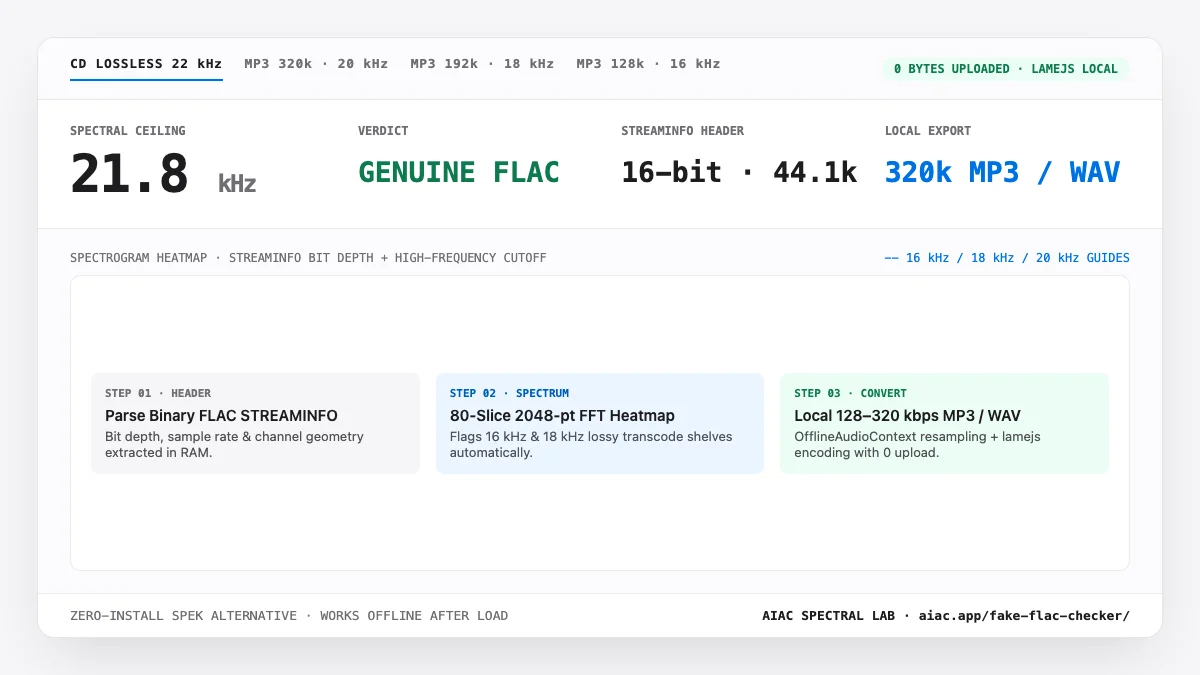
Verify whether a FLAC or WAV file is genuinely lossless or an upscaled MP3 transcode in seconds—parses raw FLAC STREAMINFO headers and renders an 80-slice 2048-point FFT spectrogram locally with zero uploads.
Ready · Compare a codec preset tab or drop any FLAC/WAV file to inspect its true frequency ceiling.
22.05 kHz
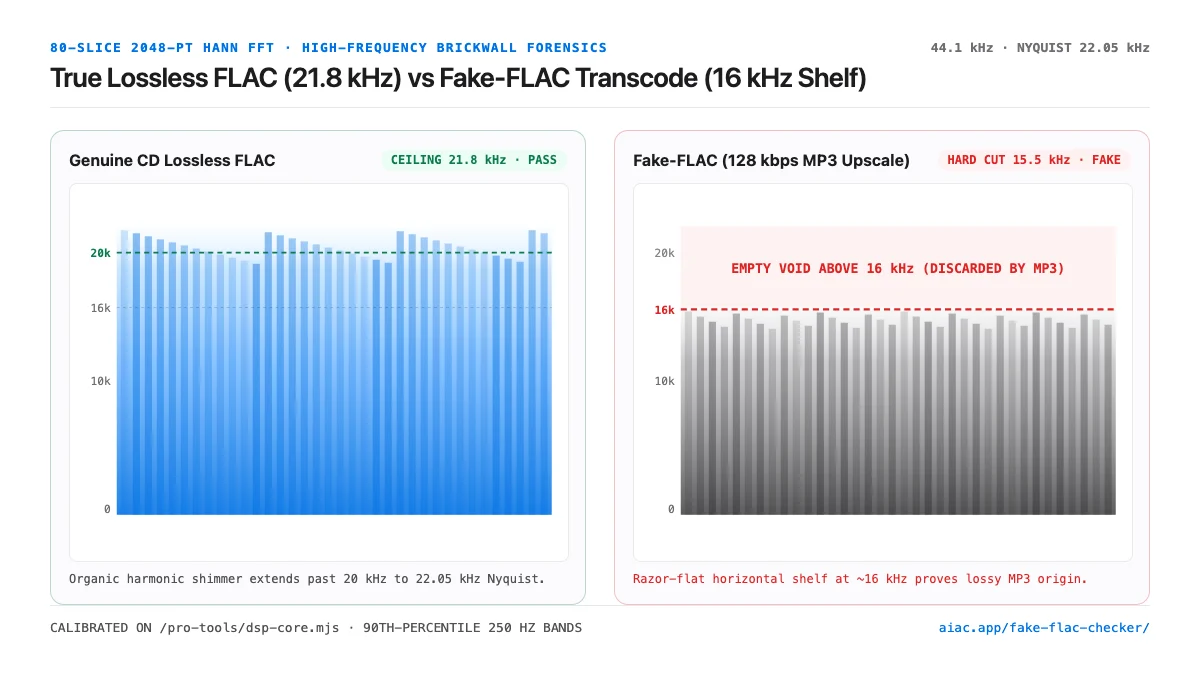
Genuine 44.1 kHz CD FLAC preserves organic harmonic energy past 20 kHz all the way to the 22.05 kHz Nyquist ceiling with no brickwall shelf.
Verified lossless? Optionally render a portable 320 kbps MP3 or 16-bit WAV copy right in your browser tab.
0 uploads — everything runs in your browser tab. FLAC STREAMINFO header parsing, 80-slice FFT computation, and PNG certificate rendering execute strictly in local RAM. See DevTools & Spek comparison ↓
ACT I · LOSSY CODEC FORENSICS
How FFT Brickwall Cutoff Detection Spots Fake FLAC
A Fake FLAC (upscaled lossy transcode) occurs when a compressed 128 kbps or 192 kbps MP3 is re-encoded inside a lossless .flac wrapper. File managers still report 950+ kbps, 16-bit depth, and 44.1 kHz sample rate—because the container truly holds uncompressed PCM samples—yet the upper harmonics discarded by the MP3 psychoacoustic encoder are permanently gone.
AIAC parses the raw binary STREAMINFO block directly from your local file bytes, then runs an 80-slice 2048-point Hann-windowed FFT across active regions of the audio. By computing the 90th-percentile magnitude spectrum in 250 Hz bands relative to the 1–6 kHz midband anchor, genuine cymbal shimmer up to 22.05 kHz separates cleanly from razor-flat MP3 low-pass brickwalls at 16 kHz or 18 kHz.
f_ceiling = max { f | P₉₀(f) ≥ P_mid(1–6 kHz) − 42 dB }
Binary STREAMINFO header · 80 active FFT slices · 2048-pt Hann window · 250 Hz bands · Automated 16/18/20 kHz verdict
ACT II · FREQUENCY CUTOFF TAXONOMY
Audio Codec Frequency Cutoff Scale
Different lossy encoders carve distinct low-pass shelves into the upper spectrum to hit their target bitrate. Click any codec signature card below to load its exact cutoff threshold into the inspection console above.
ACT III · WHY BITRATE METERS MISLEAD
Why Bitrate Labels Lie (and When Roll-Offs Are Natural)
Checking file properties in Finder, Explorer, or a media player only inspects the outer container header. Converting a 4 MB 128 kbps MP3 into a 35 MB FLAC inflates the file size by 9× and displays 1,024 kbps / 16-bit / 44.1 kHz—without restoring a single kilohertz of lost treble.
Conversely, not every track rolling off below 20 kHz is fake. Vintage analog tape masters, warm jazz vinyl rips, dark lo-fi synths, and narrowband spoken-word captures naturally slope downward gently. What exposes a lossy transcode is the geometry: a ruler-straight horizontal line slicing through transients and cymbals at an exact frequency across the entire song.
INTERACTIVE CODEC SIGNATURE INDEX
Select any codec profile below to jump back to the inspection console and compare its expected ceiling against your track:
ACT IV · CALIBRATION PROOF & SPEK COMPARISON
Fake-FLAC Forensics & Spek Comparison Reference
AIAC's spectral engine (/pro-tools/dsp-core.mjs) executes identical deterministic FFT code in your browser and in our automated Node calibration tests—scoring full-range 44.1 kHz masters at 21.8 kHz (lossless) and 16 kHz brickwall transcodes at 15.5 kHz (fake_16k). Expand the reference drawers below for exact tolerances.
80-Slice 2048-pt FFT
Evaluates the 90th-percentile energy across 80 active windows in 250 Hz bands—ignoring silent intros and flagging sharp 16/18 kHz shelves automatically.
Verify 0 Bytes in DevTools
Open Chrome DevTools → Network → Fetch/XHR before dropping a FLAC: 0 audio bytes leave your tab. Enforces form-action 'none' and runs offline after load.
Instant Audit vs Batch CLI
Ideal for instant zero-install checks on any desktop or mobile browser plus optional 320k MP3 export. For auditing 500+ album folders offline, desktop Spek or Fakin' The Funk remains faster.
| Detected Spectral Ceiling | Likely Source Codec | Visual Signature in Spectrogram | Recommended Verdict |
|---|---|---|---|
| ~15.5 – 16.5 kHz | 128 kbps MP3 (CBR/ABR) | Razor-flat horizontal brickwall shelf across the whole track; pure dark void above 16 kHz | Likely Fake-FLAC transcode |
| ~17.5 – 18.8 kHz | 192–256 kbps MP3 / AAC | Clean sharp cutoff shelf near 18–19 kHz with sparse energy reaching 20 kHz | Suspect lossy transcode (verify genre) |
| ~19.5 – 20.5 kHz | 320 kbps MP3 or warm master | Shelf right around 20 kHz (LAME 320k low-pass) vs organic gradual analog slope | Inspect transition steepness closely |
| 21.0 – 22.05 kHz | Genuine 16-bit / 44.1 kHz CD FLAC | Irregular organic harmonic peaks and cymbal shimmer reaching ~22 kHz Nyquist | Consistent with True Lossless |
| > 22.05 kHz (up to 48 kHz) | True Hi-Res 24-bit / 48–96 kHz | Ultrasonic acoustic harmonics or room air extending cleanly above CD Nyquist | Genuine Hi-Res Studio Master |
| Dimension | AIAC Online Fake-FLAC Checker | Spek (Desktop App) |
|---|---|---|
| Installation & Platforms | Zero install — runs in Chrome, Safari, Edge & Firefox on desktop or mobile | Requires downloading desktop binary (FFmpeg-based) |
| Privacy / Audio Uploads | 100% browser-local Web Audio + JS FFT — 0 bytes uploaded | 100% local desktop executable |
| Header & Automated Verdict | Parses binary FLAC STREAMINFO + auto-detects 90th-percentile cutoff & 16/18/20 kHz guides | Manual visual reading of exported spectrogram PNG |
| Report Sharing & Conversion | 1-click 1200×675 PNG authenticity report + built-in local 128–320k MP3/WAV export | Saves spectrogram PNG; separate tool needed for MP3 conversion |
| Large Folder Batching | Single-file instant inspection in browser RAM | Stronger for batch-auditing hundreds of local files offline |
Verifiable Zero-Upload Privacy & STREAMINFO Audit
Rare vinyl transfers, unreleased studio bounces, and private DJ promos should never be uploaded to an opaque conversion server just to check whether a file is authentic. AIAC inspects binary FLAC STREAMINFO frames (reading exact bit depth, sample rate, and channel layout), decodes PCM via AudioContext.decodeAudioData, and exports PNG forensic reports locally via HTML5 Canvas—zero network transfers and zero watermarks.
Practical Audiophile & DJ Library Audit Workflows
Before loading newly purchased or shared lossless files onto a club USB stick or archival NAS, run a 3-second spectral audit here to catch disguised 128 kbps MP3s that sound brittle on large PA tweeters. Once confirmed lossless, export portable copies straight in our FLAC to MP3 Converter, verify streaming playback headroom in the Online LUFS Loudness Meter, or tag harmonic DJ keys in the Song Key & BPM Finder.
ACT V · QUESTIONS & STUDIO INDEX
Frequently Asked Questions
How do you spot a fake FLAC file with a spectrogram?
Lossy codecs apply hard low-pass brickwall filters to save space: 128 kbps MP3 cuts off sharply near 16 kHz, 192 kbps MP3 around 18 kHz, and 320 kbps MP3 near 20 kHz. A genuine 44.1 kHz CD lossless FLAC carries irregular organic high-frequency energy all the way up to ~22.05 kHz (and 96 kHz Hi-Res FLAC extends past 24 kHz).
Does this online Fake-FLAC checker upload my music files to a server?
No. Raw FLAC STREAMINFO header parsing, Web Audio decoding, 80-slice 2048-point FFT spectral analysis, Canvas heatmap rendering, PNG report export, and optional local MP3/WAV conversion all execute 100% inside your browser RAM. Verify in Chrome DevTools → Network: 0 audio bytes leave your device.
How does AIAC's browser Fake-FLAC checker compare to desktop Spek?
Desktop Spek runs FFmpeg natively as an installed binary and shines for batch-scanning hundreds of folders offline. AIAC delivers instant Spek-style brickwall cutoff visualization—plus automated 16/18/20 kHz ceiling scoring, binary STREAMINFO bit-depth readout, shareable PNG reports, and local 320 kbps MP3 export—in any browser with zero installation.
Can a genuine lossless recording ever stop around 16–18 kHz?
Yes. Vintage analog tape masters, warm jazz vinyl rips, dark lo-fi synths, and spoken-word voice captures naturally roll off gently before 20 kHz. A true Fake-FLAC transcode displays a razor-straight horizontal shelf cutting sharply across the entire timeline at exactly 16 kHz or 18 kHz.
What audio formats can I audit here besides FLAC?
You can inspect FLAC, WAV, AIFF, ALAC/M4A, OGG, MP3, and MP4 audio tracks directly in your browser. For FLAC and WAV files, AIAC parses native bit depth (16-bit vs 24-bit), sample rate, and stream geometry straight from the binary container header.
How accurate is AIAC's automated Fake-FLAC detector?
Our shared DSP core (/pro-tools/dsp-core.mjs) computes the 90th-percentile magnitude spectrum across 80 active FFT slices in 250 Hz bands relative to 1–6 kHz midband energy. On automated calibration tests, full-range 44.1 kHz studio audio reads 21.8 kHz (lossless) while 16 kHz brickwall transcodes read 15.5 kHz (fake_16k).
Can a 24-bit / 96 kHz Hi-Res FLAC also be fake or upsampled?
Yes. If a 96 kHz file was upsampled from a standard 44.1 kHz CD rip, its spectrogram will show a hard ceiling right at 22.05 kHz with completely empty ultrasonic space between 22 kHz and 48 kHz. Genuine Hi-Res studio recordings exhibit faint harmonic tails extending above 22.05 kHz.
Companion Browser-Local Audio Tools
- FLAC to MP3 Converter Convert verified lossless FLAC masters to 128–320 kbps MP3 or 16-bit WAV locally with resampling. →
- Online LUFS Loudness Meter EBU Tech 3341 calibrated ITU-R BS.1770-4 LUFS, LRA & 48-tap 4× True Peak meter in your browser. →
- SoundCraft Online DAW Pure Rust WebAssembly multitrack studio with 25+ DSP plugins, strict CSP sandbox, and lossless bounce. →
- All AIAC Browser Audio Tools Explore the complete zero-upload audio tool directory, workflow guide, and honest comparisons. →